
Three Tools, Three Philosophies — And You’re Probably Using the Wrong One
Claude Code accounts for roughly 4% of all public GitHub commits — about 135,000 per day. That stat alone should make you rethink which AI coding tool deserves your attention. But here’s what most comparison articles won’t tell you: these three tools aren’t competing in the same category. Comparing Claude Code, Cursor, and GitHub Copilot is like comparing a senior architect, a full-stack IDE, and a fast typist. They operate at fundamentally different levels of intelligence, autonomy, and scope.
I’ve spent the past several months working with all three across production codebases — Python FastAPI backends, React frontends, and infrastructure-as-code setups. The productivity gap between choosing the right tool for the right task and blindly sticking with one is staggering. We’re talking 3-5x faster development when you match the tool to the job.
Here’s the uncomfortable truth most developers haven’t internalized yet: 95% of engineers now use AI coding tools at least weekly, but the majority are leaving 70% of the productivity gains on the table because they picked one tool and stopped exploring. The landscape shifted dramatically — Claude Code went from zero to market leader in eight months, Cursor grew 35% in nine months, and Copilot’s coding agent now lets you assign Claude, Codex, or Copilot to the same GitHub issue simultaneously.
This article breaks down the seven differences that actually determine which tool fits your workflow. Not marketing bullet points — real architectural distinctions that change how you write code every day. Here’s what you’ll learn:
- Why each tool operates at a different “intelligence level” — function, file, or system
- How benchmark scores translate (or don’t) to real-world coding speed
- The actual pricing math that most comparison articles get wrong
- When to use each tool — and when combining two beats picking one
- Code examples showing the exact same task across all three tools
- Enterprise considerations that matter beyond feature checklists
- A decision framework based on your specific workflow, not generic advice
Whether you’re a solo developer choosing your first AI coding tool or a tech lead evaluating options for a 50-person engineering team, these seven differences will save you weeks of trial-and-error.
Claude Code vs Cursor vs GitHub Copilot: Understanding the Intelligence Gap
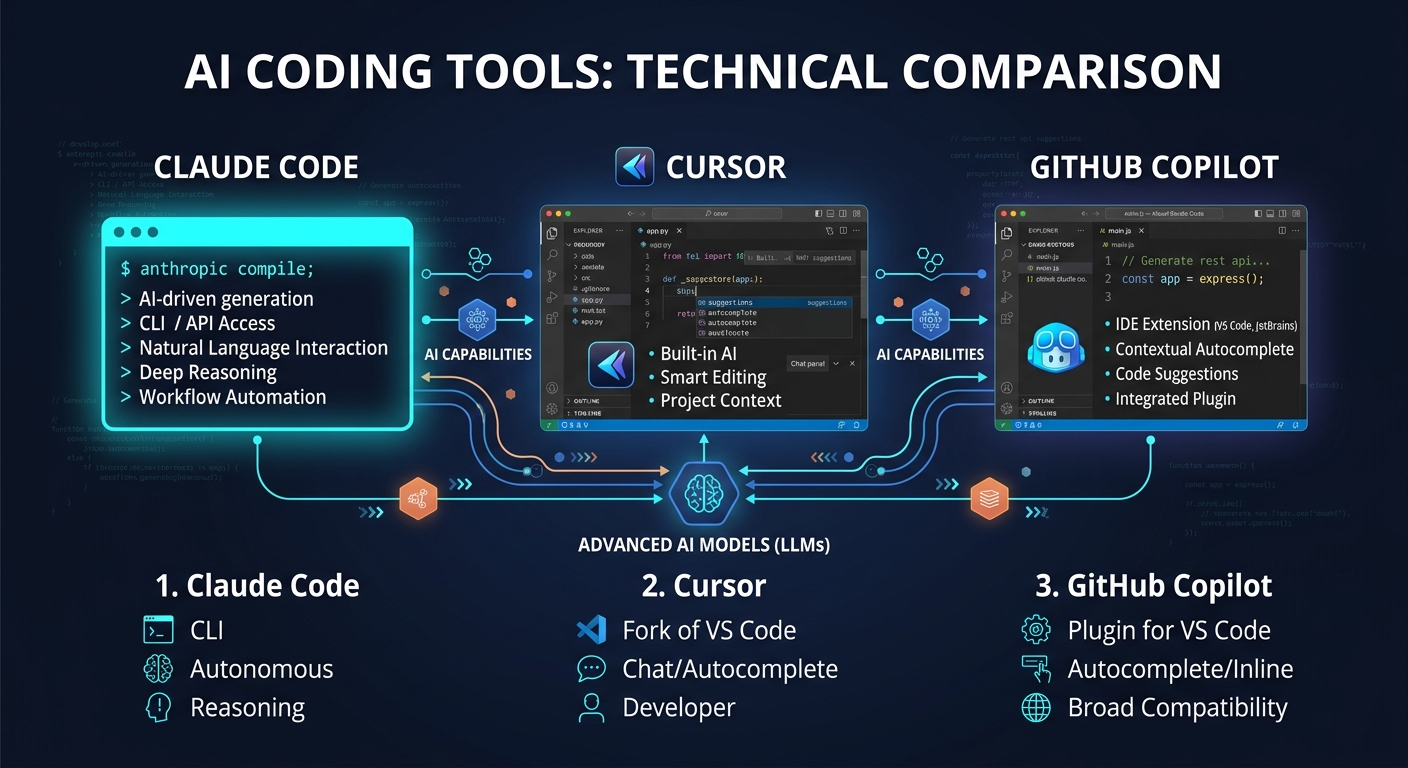
Claude Code vs Cursor vs GitHub Copilot represents three distinct approaches to AI-assisted coding: terminal-first agentic development, AI-native IDE integration, and universal editor plugin. The fundamental difference isn’t features — it’s the scope of reasoning each tool brings to your code.
Think of it this way. Copilot sees the function you’re writing and suggests the next line. Cursor sees the files in your project and understands how changes propagate across them. Claude Code sees your entire repository — dependencies, data models, test suites, configuration — and reasons about the system as a whole. That’s not marketing language. It’s an architectural constraint determined by context window size and how each tool feeds your codebase into the model.
In practice, this gap shows up in surprising ways. I ran the same task across all three — adding role-based access control to a FastAPI backend with 15 endpoints. Claude Code generated the entire RBAC implementation in one pass: models, decorators, middleware, and applied them to every endpoint. Four minutes, zero manual fixes. Cursor needed three prompts and missed applying the decorator to existing endpoints. Copilot autocompleted individual lines but had no concept of the overall RBAC architecture — I was basically writing it myself with fancy autocomplete.
| Dimension | Claude Code | Cursor | GitHub Copilot |
|---|---|---|---|
| Reasoning Scope | Entire repository (1M tokens) | Indexed codebase (~200K + repo index) | Current function (~8K-128K tokens) |
| Intelligence Level | System-level architecture | File and cross-file awareness | Function-level suggestions |
| Autonomy | High — plans and executes independently | Medium — executes described intent | Low — completes what you start |
| Platform | Terminal CLI + IDE plugins | Standalone IDE (VS Code fork) | Plugin for 6+ editors |
| SWE-bench Score | 80.8% Verified (Opus 4.6) | 51.7% Verified (multi-model) | 56.0% Verified |
| Best For | Complex multi-file tasks, refactoring | Daily coding, multi-file editing | Inline completions, boilerplate |
| Price (Pro) | $20/mo (token-based) | $20/mo (credit-based) | $10/mo (request-based) |
The key trade-off here is straightforward: Claude Code wins on raw intelligence and autonomy but lives in the terminal. Cursor wins on speed and visual multi-file editing but locks you into a VS Code fork. Copilot wins on breadth and simplicity but can’t reason about your system architecture. Picking one depends entirely on the cognitive level where you spend most of your coding time.
Best Practices
- Match the tool to the task complexity — don’t use Claude Code for one-line fixes, and don’t use Copilot for 20-file refactors
- Test all three on your actual codebase before committing — free tiers exist for each
- Consider the combo approach: most productive developers use two tools together
Common Mistakes
- Using only Copilot for everything — it’s excellent at line completion but can’t reason about cross-file dependencies, so you miss the biggest productivity gains
- Assuming SWE-bench scores directly translate to your workflow — the 80.8% vs 56.0% gap matters less than which tasks you actually do daily
- Switching IDE just for AI features without evaluating the workflow disruption cost — Cursor’s power comes with a learning curve if you’re deeply invested in JetBrains
When to Use / When NOT to Use
Use Claude Code when: you need full-repository reasoning, multi-file refactoring, architecture decisions, or autonomous feature implementation across dozens of files.
Use Cursor when: you want visual multi-file editing, fast inline completions, and an AI-native IDE experience without leaving a familiar VS Code environment.
Use Copilot when: you need AI in your existing IDE (JetBrains, Neovim, Xcode), want zero workflow disruption, or need enterprise compliance features.
Avoid choosing based on: marketing claims, a single benchmark, or price alone — the cheapest tool that doesn’t fit your workflow is the most expensive choice you’ll make.
How Claude Code Works: Terminal-First Agentic Development
Claude Code is Anthropic’s terminal-based AI coding agent that operates by reading your entire codebase, planning changes across multiple files, and executing them autonomously with a review gate before any modification. It’s not an IDE plugin or an autocomplete engine — it’s closer to having a senior developer pair-programming with you through the command line.
What makes Claude Code fundamentally different is the 1M token context window. That’s roughly 25,000-30,000 lines of code held in memory simultaneously. No chunking, no retrieval hacks, no losing context halfway through a complex refactor. When you ask Claude Code to “add OAuth2 authentication to this SaaS application,” it reads your entire data model, understands your existing auth patterns, identifies every file that needs modification, and produces a complete implementation plan before writing a single line.
Here’s what a typical Claude Code session looks like for adding a caching layer to an existing API:
# Start Claude Code in your project directory
$ cd ~/projects/my-fastapi-app
$ claude

# Claude Code reads the codebase, understands the structure
# Then you describe what you need:
> Add Redis caching to the /products and /categories endpoints.
> Use a 5-minute TTL. Invalidate cache on POST/PUT/DELETE.
> Add cache hit/miss metrics to the existing Prometheus setup.

# Claude Code will:
# 1. Analyze existing endpoint structure and dependencies
# 2. Check your requirements.txt / pyproject.toml for Redis packages
# 3. Create a caching middleware with proper error handling
# 4. Modify each endpoint to use the cache
# 5. Add cache invalidation to mutation endpoints
# 6. Integrate with your existing Prometheus metrics
# 7. Write tests for the caching behavior
# 8. Show you a complete diff before applying changes
That entire workflow happens in a single session. No back-and-forth prompting, no copy-pasting between files. Claude Code understands the relationships between your models, routes, middleware, and tests — and it modifies all of them coherently.
The Agent Teams feature takes this further. You can spawn multiple Claude Code instances that work in parallel — one researches SDK patterns, another writes the implementation (blocked until research completes), and a third writes tests simultaneously. Each agent gets its own context window. No pollution between tasks. A team of 16 Claude agents wrote a 100,000-line C compiler in Rust that compiles the Linux kernel with a 99% GCC torture test pass rate. That’s not a toy demo.
Best Practices
- Use Sonnet 4.6 for 80% of tasks — it handles most coding work at roughly half the cost of Opus, and developers preferred it over prior Opus models 70% of the time in Anthropic’s own testing
- Use plan mode (Shift+Tab) before complex implementations — it explores the codebase first and proposes an approach, preventing expensive rework
- Keep prompts specific: “add input validation to the login function in auth.ts” burns far fewer tokens than “improve this codebase”
- Reset context between unrelated tasks to avoid token accumulation
Common Mistakes
- Running Opus on every task — Opus 4.6 costs $5/$25 per million tokens vs Sonnet’s $3/$15. Reserve Opus for architecture decisions and hard debugging sessions
- Ignoring the 5-hour rolling window limit — Pro gives you ~44,000 tokens per window. Open-ended prompts on large codebases can burn through 4 hours of usage in 3 prompts
- Expecting IDE-level autocomplete — Claude Code isn’t optimized for rapid inline suggestions. That’s not what it’s built for
When to Use / When NOT to Use
Use when: tasks touch 10+ files, you need full-repo reasoning, you’re doing large-scale refactoring, or the task requires understanding complex dependency chains across your entire application.
Avoid when: you just need fast inline completions while typing, you’re not comfortable with terminal workflows, or you need predictable flat-rate billing without worrying about token consumption.
How Cursor Works: The AI-Native IDE That Indexes Everything
Cursor is a standalone IDE built as a VS Code fork that indexes your entire repository on load and makes every AI interaction aware of your full project architecture. It’s not a plugin bolted onto an editor — the AI is woven into every layer of the IDE, from tab completions to multi-file generation.
The standout feature is Composer mode. Describe a multi-file change in plain English — “add a rate limiting middleware to all API routes and update the relevant tests” — and Cursor plans the changes across every affected file, shows you a visual diff, and executes on approval. It completes these tasks 30% faster than the equivalent Copilot workflow on benchmarks, averaging 62.9 seconds per task vs Copilot’s 89.9 seconds.
Here’s what Cursor’s .cursorrules file looks like — a project-level configuration that automatically shapes how AI writes code for your specific codebase:
{
  "rules": [
    {
      "description": "Project coding standards",
      "content": "Always use TypeScript strict mode. Prefer functional components with hooks. Use Zod for runtime validation. All API responses must follow the ApiResponse wrapper type. Error handling must use the AppError class hierarchy. Tests use vitest with React Testing Library."
    },
    {
      "description": "Architecture patterns",
      "content": "Follow the repository pattern for data access. Services contain business logic. Controllers handle HTTP concerns only. Use dependency injection via the container in src/di/. Never import database modules directly in controllers."
    },
    {
      "description": "Naming conventions",
      "content": "Files: kebab-case. Types/interfaces: PascalCase with I prefix for interfaces. Functions: camelCase. Constants: SCREAMING_SNAKE_CASE. Test files: *.test.ts colocated with source."
    }
  ]
}
Every Cursor interaction — autocomplete, chat, Composer — respects these rules automatically. Copilot has copilot-instructions.md which serves a similar purpose, but Cursor’s integration runs deeper because it controls the entire IDE. Your team’s coding standards get enforced by the AI without anyone needing to remember them.
Cursor also introduced cloud agents that run in isolated VMs with computer use capabilities. They can navigate browser UIs to test changes and record video proof of work — something Copilot’s agent can’t do. And shared team indexing means new team members reuse existing codebase indices and start querying in seconds instead of waiting hours for a fresh index build.
Best Practices
- Set up .cursorrules immediately — it’s the single highest-impact configuration for code quality consistency
- Use Auto mode for routine completions (unlimited, cost-optimized) and switch to premium models only for complex Composer sessions
- Take advantage of shared team indexing for faster onboarding on large codebases
Common Mistakes
- Burning through fast premium requests on simple completions — Pro gives you 500 fast requests per month, and heavy Composer sessions with Claude Sonnet 4 can exhaust this in a week
- Not indexing large repositories before starting — Cursor’s intelligence depends on the index quality
When to Use / When NOT to Use
Use when: you want the fastest AI-native IDE experience, your team values visual multi-file editing, and you’re willing to commit to a VS Code-based workflow.
Avoid when: you’re deeply invested in JetBrains or Neovim workflows where switching editors creates more friction than the AI features save, or your tasks consistently require full-repo reasoning beyond Cursor’s scope.
How GitHub Copilot Works: AI Inside Your Existing Editor
GitHub Copilot installs as an extension in VS Code, JetBrains, Neovim, Visual Studio, Xcode, and Eclipse. It requires zero workflow disruption and becomes productive within minutes of installation. For teams that can’t afford to switch editors or retrain developers, this zero-friction adoption is a decisive advantage that neither Claude Code nor Cursor can match.
The big update that changed everything: Copilot’s coding agent now spins up GitHub Actions VMs, clones your repo, and works autonomously. Since February, all paid users can choose Claude, Codex, or Copilot as the agent model. You can assign the same issue to all three simultaneously and compare their outputs. That multi-model comparison feature is genuinely unique — neither Claude Code nor Cursor offers anything equivalent.
Here’s how you’d use Copilot’s agent to delegate work directly from a GitHub issue:
# In GitHub, create an issue:
# Title: Add rate limiting to /api/v2/* endpoints
# Body: Implement sliding window rate limiter using Redis.
#       Limit: 100 requests per minute per API key.
#       Return 429 with Retry-After header when exceeded.
#       Add integration tests.

# Then assign the issue to Copilot coding agent
# Choose your model: Claude | Codex | Copilot
# (Or assign all three and compare the PRs)

# Copilot agent will:
# 1. Spin up a GitHub Actions VM
# 2. Clone the repository
# 3. Implement the changes
# 4. Run your CI pipeline
# 5. Fix any test failures iteratively
# 6. Open a draft PR with commits + CI results
# 7. Respond to review comments
The GitHub ecosystem integration is Copilot’s deepest moat. It generates workflow configurations in GitHub Actions, writes PR review summaries, and enables issue-to-implementation flows directly from the GitHub interface. For teams whose entire development lifecycle lives in GitHub, this native integration eliminates an entire category of context-switching.
Copilot’s free tier is genuinely usable: 2,000 inline completions and 50 premium requests per month, indefinitely. Students, open-source contributors, and verified teachers get Copilot Pro for free. That accessibility matters — it’s how most developers first experience AI-assisted coding.
Best Practices
- Use copilot-instructions.md in your repo root to define project-specific coding standards the AI should follow
- Take advantage of the multi-model agent picker — assign complex issues to Claude and Codex simultaneously, then pick the better PR
- GPT-5 mini and GPT-4.1 cost zero premium requests — use these for routine tasks and save premium requests for complex agent work
Common Mistakes
- Treating Copilot as a replacement for deeper tools — it’s excellent at function-level completion but can’t reason about system architecture the way Claude Code can
- Ignoring the coding agent entirely — many developers still use Copilot only for autocomplete and miss the autonomous agent capabilities added recently
When to Use / When NOT to Use
Use when: you need AI in JetBrains, Neovim, or Xcode (only real option), your team requires enterprise compliance with IP indemnification, or you want the smoothest possible onboarding with zero editor changes.
Avoid when: your primary need is complex multi-file refactoring, full-repository reasoning, or deep codebase indexing — Cursor and Claude Code are measurably better at these tasks.
Pricing Breakdown: The Real Math Behind Each Tool
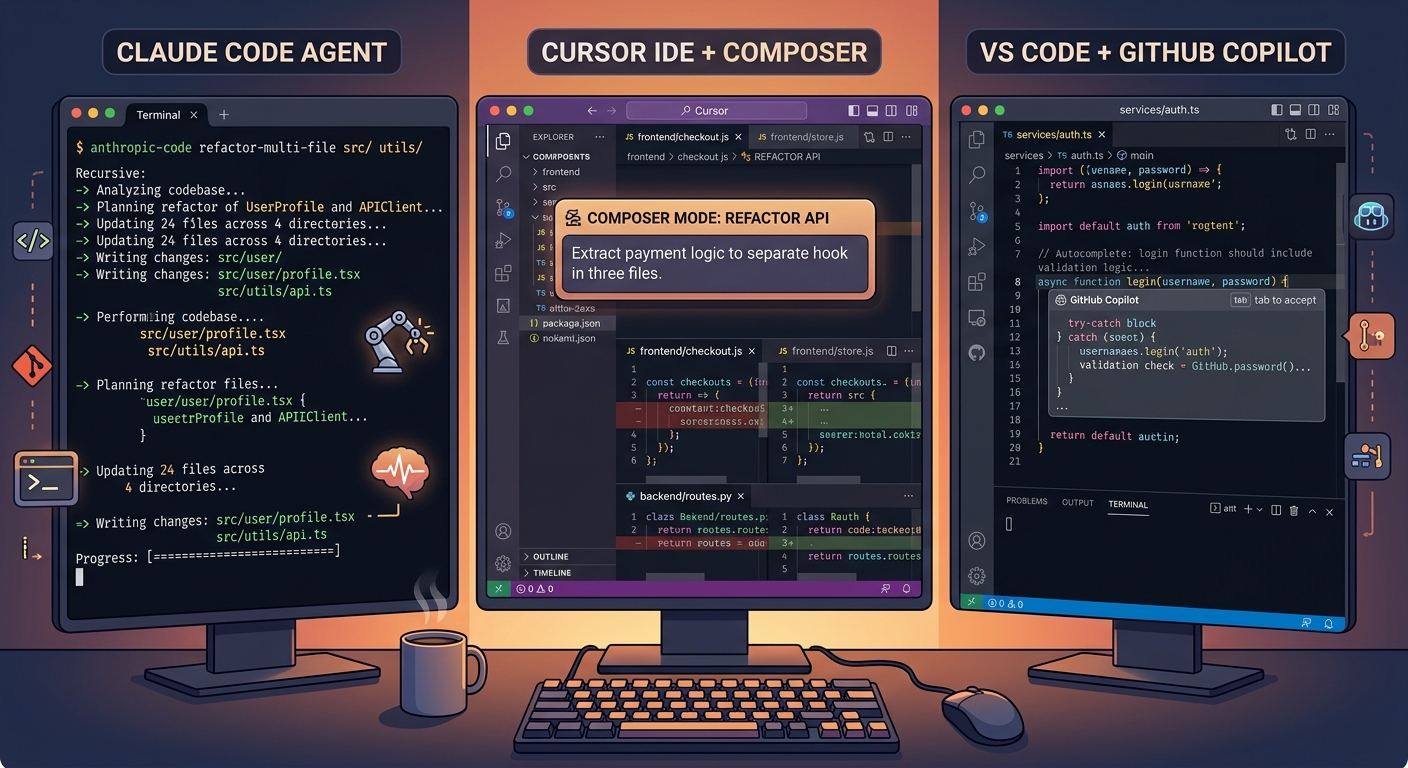
Copilot costs half of what Cursor charges at every comparable tier. But the cheapest tool isn’t always the cheapest decision — especially when the more expensive option saves you three hours per day. Here’s the pricing landscape with numbers that actually reflect how developers use these tools in practice.
| Tier | Claude Code | Cursor | GitHub Copilot |
|---|---|---|---|
| Free | No Claude Code access | 50 premium + 500 free requests | 2,000 completions + 50 premium |
| Pro / Individual | $20/mo (~44K tokens/5hr) | $20/mo ($20 credit pool) | $10/mo (300 premium requests) |
| Power User | $100/mo (Max 5x) or $200/mo (Max 20x) | $60/mo (Pro+) or $200/mo (Ultra) | $39/mo (Pro+ with all models) |
| Team / Business | $100/seat/mo (Premium) | $40/user/mo | $19/user/mo |
| Enterprise | Custom (500K context, HIPAA) | Custom pricing | $39/user/mo |
Now here’s where it gets interesting. A developer instrumented their actual Claude Code usage and found that at full Max 20x usage, the equivalent API cost would be approximately $3,650/month — making the $200 subscription about 18x cheaper. But that’s the ceiling. For most developers on the Pro plan doing focused 2-3 hour sessions, $20/month covers everything comfortably.
The real cost calculation for a 10-person team tells a starker story: Copilot Business runs $2,280/year. Cursor Business costs $4,800/year. Claude Code with Premium team seats hits $12,000/year. That’s a significant spread. But if Claude Code’s deeper reasoning saves each developer even one hour per week on complex refactoring, the ROI math flips quickly.
# Quick cost comparison calculator
from dataclasses import dataclass
from typing import Optional


@dataclass
class TeamCost:
    """Calculate annual AI coding tool costs for a team."""
    tool_name: str
    per_seat_monthly: float
    team_size: int
    power_user_addon: float = 0.0  # Additional cost for power users
    power_user_count: int = 0

    @property
    def annual_cost(self) -> float:
        """Total annual cost including power user upgrades."""
        base = self.per_seat_monthly * self.team_size * 12
        power = self.power_user_addon * self.power_user_count * 12
        return base + power

    @property
    def monthly_per_dev(self) -> float:
        """Effective monthly cost per developer."""
        return self.annual_cost / (self.team_size * 12)


def compare_tools(team_size: int = 10, power_users: int = 3) -> None:
    """Compare annual costs across all three tools."""
    tools = [
        TeamCost("GitHub Copilot Business", 19.0, team_size),
        TeamCost("Cursor Business", 40.0, team_size),
        TeamCost(
            "Claude Code Team (mixed seats)",
            20.0,  # Standard seats for non-heavy users
            team_size,
            power_user_addon=80.0,  # Upgrade delta to Premium
            power_user_count=power_users,
        ),
    ]

    print(f"\n{'Tool':10} {'Monthly/Dev':>12}")
    print("-" * 64)
    for t in tools:
        print(f"{t.tool_name:8,.0f} ${t.monthly_per_dev:>10.2f}")


# Example: 10-person team, 3 power users needing Claude Code
compare_tools(team_size=10, power_users=3)
# Output:
# Tool                                      Annual  Monthly/Dev
# ----------------------------------------------------------------
# GitHub Copilot Business                   $2,280       $19.00
# Cursor Business                           $4,800       $40.00
# Claude Code Team (mixed seats)            $5,280       $44.00
The mixed-seat approach for Claude Code makes it far more competitive than the sticker price suggests. Not every developer needs Premium seats with Claude Code access — only your senior engineers doing complex refactoring work. Standard seats at $20/month handle everyone else.
Best Practices
- Start with free tiers for all three, then upgrade based on actual usage patterns — not projected needs
- For Claude Code, track your token consumption for a month before choosing between Pro and Max
- Use mixed seat types on team plans — not everyone needs the premium tier
Common Mistakes
- Choosing based on sticker price alone — Copilot at $10/mo is meaningless if you still spend 3 hours manually doing what Claude Code handles in 10 minutes
- Not accounting for the 5-hour rolling window on Claude Code — heavy sessions can burn through Pro limits mid-task, forcing you to wait or pay overages
When to Use / When NOT to Use
Go with Copilot when: budget is the primary constraint, especially for teams over 20 people where the per-seat savings compound significantly.
Go with Cursor when: you want predictable pricing with deep AI integration and your team is standardized on VS Code.
Go with Claude Code when: your complex refactoring and architecture tasks justify the premium, and you can use mixed seating to control costs.
Benchmark Performance: What the Numbers Actually Tell You
Claude Opus 4.6 scores 80.8% on SWE-bench Verified — the highest score among all AI coding tools as of the current benchmark cycle. But comparing that number directly against Copilot’s 56.0% or Cursor’s 51.7% on the same benchmark is both accurate and misleading at the same time.
Here’s why. SWE-bench measures the ability to fix real GitHub issues and pass tests. The 80.8% score reflects Claude Code running with its full agentic scaffold — reading files, executing commands, iterating on failures. Copilot and Cursor scored lower on this particular benchmark, but Cursor completes individual tasks 30% faster (62.9 seconds vs 89.9 seconds for Copilot). Speed and accuracy measure different things, and both matter depending on what you’re doing.
And there’s a benchmark variant problem that most articles gloss over. OpenAI reports SWE-bench Pro scores while Anthropic reports SWE-bench Verified scores — these are different benchmark variants with different problem sets. Direct score comparison across them isn’t valid. On the apples-to-apples SWE-bench Pro comparison, Claude Opus 4.6 scores 55.4% and GPT-5.3 Codex scores 56.8%. Much closer than the headline numbers suggest.
The benchmark that DevOps engineers should actually care about is Terminal-Bench 2.0, which measures real-world terminal tasks like shell scripting and CI/CD pipeline debugging. GPT-5.3 Codex leads at 77.3%, Gemini 3.1 Pro sits at 68.5%, and Claude Opus 4.6 comes in at 65.4%. If your workflow is terminal-native — scripts, infrastructure-as-code, CLI tools — the Codex-powered models available through Copilot have a measurable edge.
# Simulating a real benchmark comparison scenario
# Task: Debug a race condition in an async payment endpoint
import asyncio
from dataclasses import dataclass
from typing import Literal


@dataclass
class BenchmarkResult:
    tool: str
    found_bug: bool
    time_minutes: float
    fix_quality: Literal["production-ready", "good", "needs-work", "failed"]
    manual_fixes_needed: int


# Real-world test: race condition in concurrent payment processing
# Two requests hit the payment endpoint simultaneously,
# both succeed — causing double charges
results = [
    BenchmarkResult(
        tool="Claude Code",
        found_bug=True,
        time_minutes=2.0,
        fix_quality="production-ready",
        manual_fixes_needed=0,
    ),
    BenchmarkResult(
        tool="Cursor",
        found_bug=True,  # After a hint about the endpoint
        time_minutes=5.0,
        fix_quality="good",
        manual_fixes_needed=1,
    ),
    BenchmarkResult(
        tool="GitHub Copilot",
        found_bug=False,
        time_minutes=0.0,  # Didn't identify the issue
        fix_quality="failed",
        manual_fixes_needed=0,  # Can't fix what you can't find
    ),
]


def print_results(results: list[BenchmarkResult]) -> None:
    """Display benchmark results in a readable format."""
    print(f"{'Tool':<20} {'Found?':<8} {'Time':<8} {'Quality':<18} {'Fixes'}")
    print("-" * 62)
    for r in results:
        found = "Yes" if r.found_bug else "No"
        time = f"{r.time_minutes:.0f} min" if r.found_bug else "N/A"
        print(f"{r.tool:<20} {found:<8} {time:<8} {r.fix_quality:<18} {r.manual_fixes_needed}")


print_results(results)
# Tool                 Found?   Time     Quality            Fixes
# --------------------------------------------------------------
# Claude Code          Yes      2 min    production-ready   0
# Cursor               Yes      5 min    good               1
# GitHub Copilot       No       N/A      failed             0
The pattern is consistent across testing: Claude Code finds bugs that require multi-file reasoning. Cursor catches issues within its indexed context but sometimes needs prompting to look in the right place. Copilot misses architectural bugs entirely because its context window doesn’t extend far enough to trace complex data flows.
Best Practices
- Don’t pick tools based on a single benchmark — SWE-bench, Terminal-Bench, and HumanEval each measure different capabilities
- Test on your actual codebase and tasks — benchmark performance on standardized problems doesn’t always predict performance on your specific stack
- Consider the benchmark variant before comparing scores — SWE-bench Verified and SWE-bench Pro are not interchangeable
Common Mistakes
- Citing the 80.8% vs 56.0% gap as proof that Claude Code is always better — it dominates on full-repo reasoning tasks but isn’t faster for quick inline completions
- Ignoring Terminal-Bench results if you do significant DevOps work — GPT-5.3 Codex (available through Copilot) leads this benchmark by a wide margin
When to Use / When NOT to Use
Use benchmarks when: you need data points to justify a tool choice to your team or management — just make sure you’re citing the right benchmark for your use case.
Avoid using benchmarks when: you’re making the final decision — run all three on your actual codebase for a week instead. Real-world performance on your stack matters more than any leaderboard.
Context Windows and Codebase Understanding
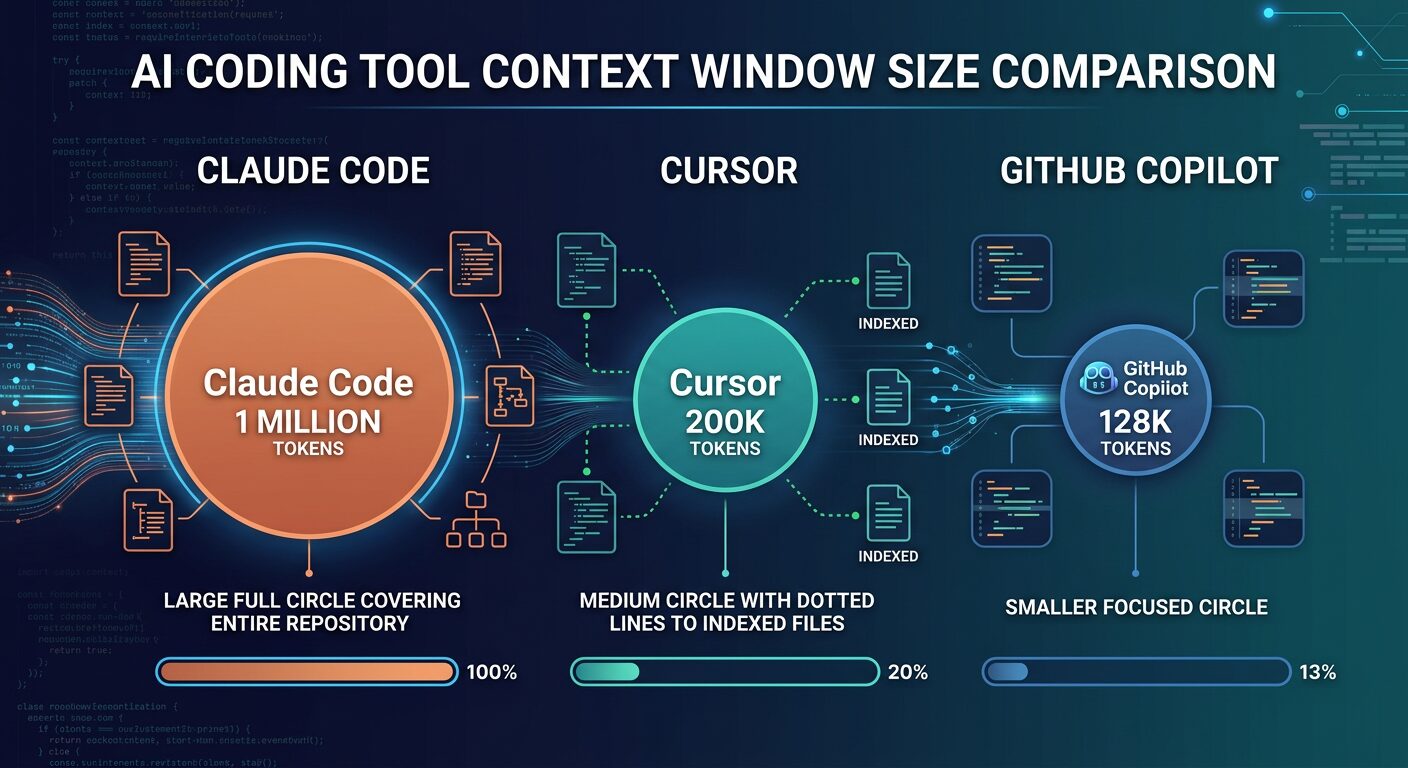
Context window size determines how much of your codebase the AI can reason about simultaneously. Claude Code holds up to 1 million tokens — roughly 25,000-30,000 lines of code — in a single context. Cursor works with approximately 200K tokens plus deep semantic indexing of your full repository. Copilot operates with 8K-128K tokens depending on the model and IDE.
This isn’t just a spec sheet number. It’s the difference between an AI that understands your entire application and one that sees only the file you have open. When you ask Claude Code to refactor an authentication system, it reads your user model, session store, middleware chain, all endpoint handlers, test suite, and configuration — simultaneously. It catches the race condition between session creation and permission assignment because it can hold both files in memory at the same time.
Cursor compensates for its smaller per-request context with deep semantic indexing. It builds a persistent index of your entire codebase and queries it for every interaction. The practical result is surprisingly good — Cursor often “knows” about code in files you haven’t opened because the index told it. But the index is a retrieval mechanism, not true simultaneous understanding. For complex dependency chains that span dozens of files, Claude Code’s raw context advantage shows.
# Demonstrating the context window impact on code analysis
from typing import TypedDict


class ContextAnalysis(TypedDict):
    tool: str
    context_tokens: int
    approx_lines: int
    retrieval_method: str
    can_trace_full_dependency_chain: bool


# How each tool handles a 50,000-line codebase
analysis: list[ContextAnalysis] = [
    {
        "tool": "Claude Code (Opus 4.6)",
        "context_tokens": 1_000_000,
        "approx_lines": 30_000,
        "retrieval_method": "Direct — loads entire codebase into context",
        "can_trace_full_dependency_chain": True,
    },
    {
        "tool": "Cursor (Composer)",
        "context_tokens": 200_000,
        "approx_lines": 6_000,
        "retrieval_method": "Semantic index + active file context",
        "can_trace_full_dependency_chain": False,  # Needs multiple passes
    },
    {
        "tool": "GitHub Copilot (Agent)",
        "context_tokens": 128_000,
        "approx_lines": 3_800,
        "retrieval_method": "GitHub code search with RAG",
        "can_trace_full_dependency_chain": False,
    },
]

# The practical impact:
# A 50,000-line monorepo fits entirely in Claude Code's context.
# Cursor sees ~12% at a time but indexes the rest.
# Copilot sees ~7.6% at a time with search-based retrieval.
Cursor’s shared team indexing deserves a special mention. When a new developer joins your team, they reuse existing codebase indices and start getting context-aware suggestions in seconds. Without shared indexing, building a fresh index for a large monorepo can take hours. This is a genuine competitive advantage for teams where onboarding speed matters.
Best Practices
- For codebases over 30,000 lines, Claude Code’s 1M context provides genuinely different capabilities — not just faster, but qualitatively different reasoning about cross-cutting concerns
- Cursor’s index is only as good as your project structure — well-organized codebases with clear module boundaries get better AI assistance
- Copilot works best on GitHub-hosted repos where its code search with RAG can pull in relevant context from across the codebase
Common Mistakes
- Assuming bigger context window always means better results — for small, focused tasks, the extra context is irrelevant overhead
- Not understanding that Claude Code’s Agent Teams multiply context consumption — a 3-agent team uses roughly 7x more tokens than a single session
When to Use / When NOT to Use
Use Claude Code’s full context when: refactoring touches 20+ files, debugging requires tracing data flow across the entire application, or you’re doing a comprehensive security audit.
Cursor’s indexed context is enough when: you’re working within a well-defined module, making changes that affect 5-10 files, or doing daily feature development within established patterns.
Enterprise Features and Team Adoption
Enterprise adoption isn’t about which tool writes better code. It’s about compliance, security, administration, and whether the legal team will actually approve the purchase order. On this front, the three tools occupy very different positions.
GitHub Copilot Enterprise is the gold standard for regulated environments. IP indemnification, SOC 2 Type II compliance (inherited from GitHub), organization-level policy controls, audit logs, SCIM provisioning, and support for GitHub Enterprise Server. For teams in finance, healthcare, or government — where legal review of AI tools can take months — Copilot is often the only option that passes procurement. It’s not because it’s the best AI. It’s because Microsoft’s enterprise sales machine and GitHub’s existing compliance infrastructure make it the lowest-risk choice.
Claude Code’s enterprise offering has matured significantly. Anthropic’s Enterprise plan includes a 500K context window (double the standard 200K), HIPAA readiness, SCIM for identity management, audit logs, compliance API, custom data retention, network-level access control with IP allowlisting, and zero-data-retention policies. The 500K context window is the standout feature for enterprise development teams — loading entire large codebases without chunking becomes genuinely viable.
Cursor occupies the middle ground. SOC 2 Type II, SCIM provisioning on enterprise plans, granular admin controls, and privacy mode that disables code telemetry. Sufficient for most startups and mid-size companies, but lacking the deep compliance guarantees that heavily regulated enterprises require.
# Enterprise security checklist: what each tool supports
# Use this to evaluate compliance requirements for your organization

enterprise_comparison:
  github_copilot:
    soc2_type2: true
    ip_indemnification: true  # Unique advantage
    scim: true  # Business and Enterprise plans
    audit_logs: true  # Enterprise plan
    sso_saml: true
    ghes_support: true  # GitHub Enterprise Server
    data_retention_control: true
    zero_training_guarantee: true  # Enterprise agreement
    pooled_usage_credits: true  # Enterprise plan
    code_tracking_api: true  # Enterprise plan

  claude_code:
    soc2_type2: true  # Via Anthropic
    ip_indemnification: false  # Not available yet
    scim: true  # Enterprise plan
    audit_logs: true  # Enterprise plan
    sso_saml: true
    hipaa_ready: true  # Enterprise plan
    data_retention_control: true
    zero_training_guarantee: true  # Enterprise API agreement
    context_window_500k: true  # Enterprise exclusive
    compliance_api: true  # Enterprise plan

  cursor:
    soc2_type2: true
    ip_indemnification: false
    scim: true  # Enterprise plan
    audit_logs: true  # Enterprise plan
    sso_saml: true
    privacy_mode: true  # Disables telemetry
    data_retention_control: false  # Limited
    zero_training_guarantee: true  # Business plan default
The thing nobody mentions in enterprise comparisons: the biggest barrier to adoption isn’t features — it’s developer buy-in. Copilot wins here because it installs in minutes with zero workflow change. Cursor requires switching editors. Claude Code requires comfort with terminal workflows. I’ve seen teams buy Cursor licenses that sat unused because developers didn’t want to leave IntelliJ. The best enterprise tool is the one your team will actually use.
Best Practices
- Start the compliance review early — enterprise procurement for AI tools can take 3-6 months in regulated industries
- Pilot with a small team before company-wide rollout — track actual usage patterns to right-size licensing
- All three tools offer zero-data-retention under enterprise agreements — never paste credentials or production secrets into any AI session regardless
Common Mistakes
- Buying enterprise licenses based on feature checklists without piloting — developer adoption determines ROI more than any feature comparison
- Assuming one tool fits all teams — your frontend team might thrive with Cursor while your DevOps team needs Copilot’s JetBrains support
When to Use / When NOT to Use
Use Copilot for enterprise when: you need IP indemnification, GitHub Enterprise Server support, or your procurement team requires Microsoft-level compliance documentation.
Use Claude Code for enterprise when: you need HIPAA readiness, the 500K context window matters for your codebase size, and your team is comfortable with terminal-based workflows.
The Combo Strategy: Why Top Developers Use Two Tools
The most productive developers aren’t picking one tool. According to survey data, 70% of engineers use between two and four AI tools simultaneously, and the Claude Code + Cursor combination has emerged as the dominant power-user setup. There’s a good reason for that — each tool covers the other’s blind spot.
Here’s the workflow that’s become standard among senior engineers: Cursor runs as the primary IDE for daily coding — fast completions, visual multi-file editing, Composer mode for feature development. Claude Code gets invoked from a split terminal for the tasks that exceed Cursor’s scope — large-scale refactoring, architecture decisions, comprehensive debugging sessions, and anything requiring full-repository context. It’s a split-screen setup: Cursor open for code review, Claude Code running in the terminal for the heavy lifting.
The math works out better than you’d expect. Cursor Pro at $20/month handles 90% of daily coding tasks. Claude Code Pro at $20/month covers the remaining 10% — but that 10% represents the hardest problems where the time savings are largest. Total cost: $40/month for a workflow that’s genuinely 3-5x faster than either tool alone.
# The optimal multi-tool workflow in practice
from enum import Enum
from typing import NamedTuple


class Complexity(Enum):
    LOW = "low"          # Single file, small change
    MEDIUM = "medium"    # 2-5 files, known patterns
    HIGH = "high"        # 10+ files, cross-cutting concerns
    EXTREME = "extreme"  # Full-repo refactor, architecture change


class ToolRecommendation(NamedTuple):
    primary: str
    secondary: str | None
    reasoning: str


def recommend_tool(complexity: Complexity, task_type: str) -> ToolRecommendation:
    """Route tasks to the right tool based on complexity."""
    match complexity:
        case Complexity.LOW:
            return ToolRecommendation(
                primary="Cursor (inline completion)",
                secondary=None,
                reasoning="Fast tab completion handles simple edits efficiently",
            )
        case Complexity.MEDIUM:
            return ToolRecommendation(
                primary="Cursor (Composer mode)",
                secondary=None,
                reasoning="Visual multi-file editing with project-wide index",
            )
        case Complexity.HIGH:
            return ToolRecommendation(
                primary="Claude Code",
                secondary="Cursor for review",
                reasoning="Full-repo context needed for cross-cutting changes",
            )
        case Complexity.EXTREME:
            return ToolRecommendation(
                primary="Claude Code (Agent Teams)",
                secondary="Cursor for validation",
                reasoning="Parallel agents with dependency tracking",
            )


# Real workflow examples:
tasks = [
    (Complexity.LOW, "Fix typo in error message"),
    (Complexity.MEDIUM, "Add pagination to 3 API endpoints"),
    (Complexity.HIGH, "Migrate auth from JWT to OAuth2"),
    (Complexity.EXTREME, "Rewrite sync codebase to async"),
]

for complexity, task in tasks:
    rec = recommend_tool(complexity, task)
    print(f"\n{task}")
    print(f"  → {rec.primary}")
    if rec.secondary:
        print(f"  + {rec.secondary}")
    print(f"  Why: {rec.reasoning}")
What about Copilot in the mix? If your team uses JetBrains IDEs, Copilot fills the gap that Cursor can’t — it’s the only AI coding tool with agent mode in IntelliJ, PyCharm, and WebStorm. Some teams run Copilot in JetBrains for autocomplete while using Claude Code in the terminal for complex tasks. Not as tight an integration as Cursor + Claude Code, but it works without forcing anyone to switch editors.
The key insight from the Pragmatic Engineer survey is telling: staff+ engineers are the heaviest agent users at 63.5%. And people using agents are nearly twice as likely to feel excited about AI as those who don’t. The combo strategy isn’t about paying for more tools — it’s about accessing the agent-level capabilities (Claude Code) alongside the daily-driver IDE experience (Cursor or Copilot) that makes the productivity gains compound.
Best Practices
- Route tasks by complexity — inline completions don’t need Claude Code, and 20-file refactors don’t belong in Copilot
- Keep Claude Code in a split terminal alongside your IDE for quick access without context switching
- Use Cursor’s Composer for medium-complexity multi-file work and escalate to Claude Code only when the task exceeds what Composer handles cleanly
Common Mistakes
- Paying for three tools when two cover everything — most developers can pick Cursor + Claude Code or Copilot + Claude Code and cover 99% of use cases
- Not investing time to learn the combo workflow — the productivity gains come from routing decisions, not just having both tools installed
When to Use / When NOT to Use
Use the combo when: you work across varying complexity levels throughout the day — daily feature work plus occasional architecture decisions or large refactors.
Stick with one tool when: your work is consistently at one complexity level, budget is tight, or you’d rather master one tool deeply than learn two at a surface level.
Decision Framework: Pick Your Tools in 60 Seconds
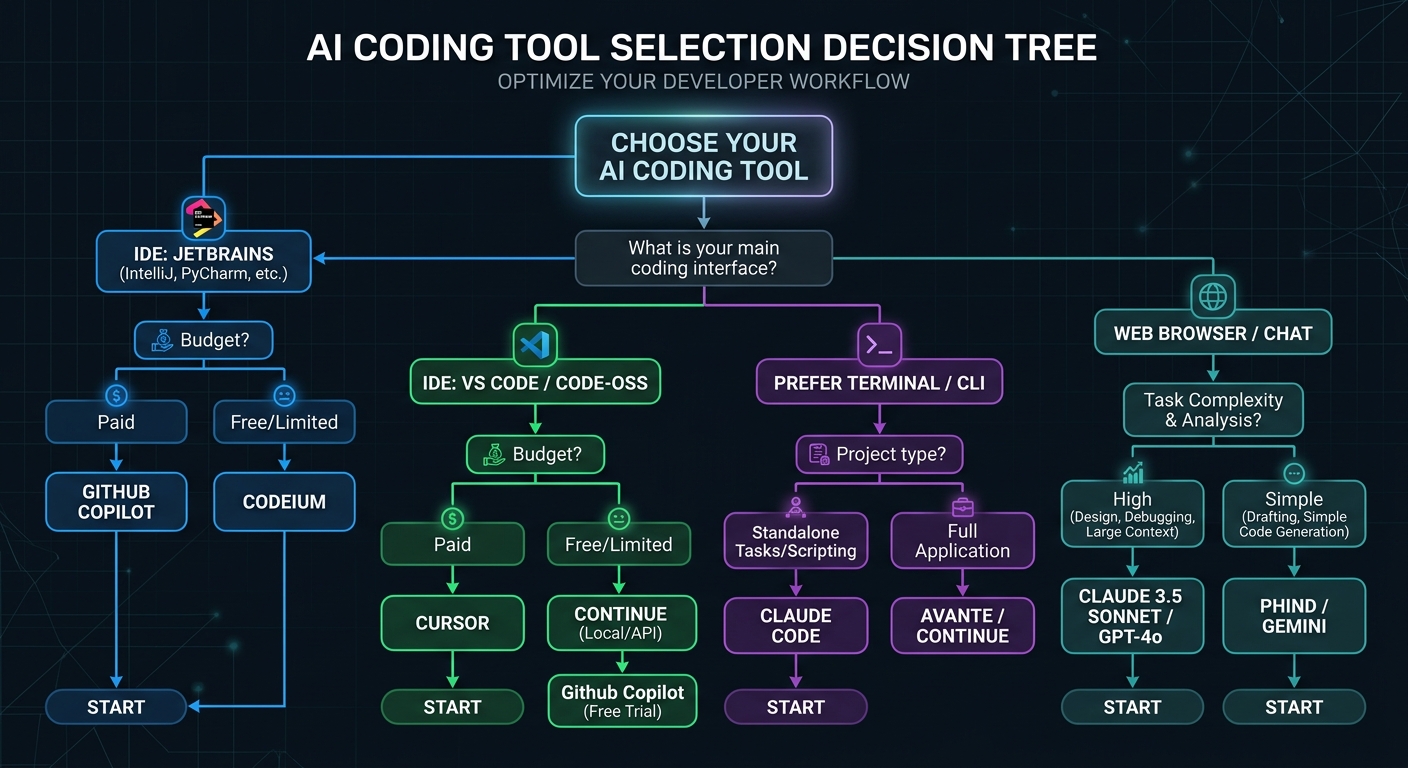
After months of testing all three tools across production codebases, the decision comes down to three questions: what IDE do you use, what’s your typical task complexity, and what’s your budget? Everything else is secondary.
| Your Situation | Best Choice | Why |
|---|---|---|
| Use JetBrains, Neovim, or Xcode | Copilot + Claude Code | Copilot is the only tool with agent mode in non-VS-Code IDEs |
| VS Code user, want best AI integration | Cursor + Claude Code | Cursor’s deeper IDE integration + Claude Code for heavy tasks |
| Team of 10+ on a budget | Copilot Business | $19/user/mo — half the price of alternatives with solid features |
| Complex multi-file refactoring daily | Claude Code (Max 5x) | 1M context + Agent Teams handle full-repo reasoning |
| Student or hobbyist | Copilot Free | 2,000 completions/mo free, Pro free for students |
| Enterprise with compliance needs | Copilot Enterprise | IP indemnification + GHES support + deepest compliance |
| GitHub-centric workflow | Copilot | Coding agent creates PRs from issues, multi-model comparison |
| Want maximum model flexibility | Cursor | 5 providers, BYOK, Claude + GPT + Gemini + Grok in one IDE |
If I had to give one recommendation to a developer who asked “just tell me what to use” — it’d be Cursor + Claude Code Pro. $40/month total. Cursor handles 90% of your daily work with the best AI-native IDE experience available. Claude Code handles the remaining 10% that requires full-repo reasoning, complex debugging, or multi-agent orchestration. That 10% is where the biggest time savings live.
But honestly? Start with the free tiers. All three have them. Spend a week using each one on your actual projects, not toy examples. The tool that clicks with your workflow is the right answer — benchmarks and pricing tables can only narrow the options, not make the final call.
Key Takeaways
- Claude Code, Cursor, and Copilot operate at different intelligence levels — system, file, and function — and picking the right one depends on where your tasks fall
- The combo of Cursor + Claude Code at $40/month delivers the best productivity gains for developers willing to learn two tools
- Copilot wins on breadth (6+ IDEs), enterprise compliance, and price — it’s the safest default for large teams
- Claude Code’s 1M context window and 80.8% SWE-bench score make it the clear leader for complex, multi-file reasoning tasks
- Benchmarks tell part of the story — test on your actual codebase before committing
Action Items
- Sign up for free tiers of all three tools and test each on a real project for one week
- Identify your typical task complexity distribution — what percentage of your work is inline completion vs multi-file editing vs full-repo refactoring?
- Calculate team costs using the mixed-seat approach — not every developer needs the same tier
- Set up a .cursorrules or copilot-instructions.md file immediately — project-level AI configuration is the single highest-impact optimization
Resources
- Claude Code Official Documentation — comprehensive setup and configuration guide from Anthropic
- Cursor Documentation — covers Composer, .cursorrules, cloud agents, and team features
- GitHub Copilot Docs — covers agent mode, coding agent, and enterprise setup
- SWE-bench Leaderboard — current benchmark standings for AI coding tools
Frequently Asked Questions
What is Claude Code and how is it different from Cursor?
Claude Code is Anthropic’s terminal-based AI coding agent that reads your entire codebase (up to 1M tokens) and executes multi-file changes autonomously. Cursor is a standalone AI-native IDE (VS Code fork) that provides visual multi-file editing, inline completions, and Composer mode. The core difference is platform: Claude Code runs in your terminal alongside any editor, while Cursor replaces your editor entirely. Claude Code excels at full-repository reasoning; Cursor excels at day-to-day visual editing speed.
How much does Claude Code cost compared to GitHub Copilot?
Claude Code Pro costs $20/month with token-based usage limits (~44,000 tokens per 5-hour window). GitHub Copilot Pro costs $10/month with 300 premium requests. For teams, Copilot Business is $19/user/month vs Claude Code Premium seats at $100/user/month. Copilot is cheaper at every tier, but Claude Code provides deeper reasoning capabilities that can justify the premium for complex development work.
Is GitHub Copilot still worth using if I have Cursor?
For most individual developers, the overlap between Cursor and Copilot is significant enough to choose one or the other. The exception: if your team requires Copilot’s enterprise compliance features (IP indemnification, GHES support), or you work in JetBrains IDEs where Cursor isn’t available. Copilot’s multi-model agent comparison — assigning the same issue to Claude, Codex, and Copilot simultaneously — is also unique.
Why does Claude Code score higher on SWE-bench than Cursor and Copilot?
Claude Code’s 80.8% SWE-bench Verified score reflects the Opus 4.6 model running with its full agentic scaffold — file reading, command execution, iterative debugging. Cursor (51.7%) and Copilot (56.0%) scored lower because their agent architectures are designed for different use cases. SWE-bench measures full-repo bug fixing, which favors Claude Code’s terminal-first approach. For inline completion speed, Cursor actually outperforms both competitors.
When should I use Claude Code instead of Cursor for a task?
Use Claude Code when your task requires reasoning across your entire repository simultaneously — refactoring that touches 20+ files, adding authentication systems to existing applications, comprehensive security audits, or implementing features with complex cross-cutting concerns. If the task would require opening more than five or six files in Cursor to provide sufficient context, Claude Code’s 1M token window handles it more reliably in a single pass.
Can I use Claude Code and Cursor together?
Yes, and this is the most productive setup according to survey data. Run Cursor as your primary IDE for daily coding and visual editing. Keep Claude Code in a split terminal for complex tasks that exceed Cursor’s multi-file scope — large refactors, architecture decisions, and comprehensive debugging. The combo costs $40/month total and covers virtually every coding scenario you’ll encounter.
What is the best AI coding tool for JetBrains users?
GitHub Copilot is the only AI coding tool with full agent mode support in JetBrains IDEs (IntelliJ, PyCharm, WebStorm). Cursor doesn’t support JetBrains at all. Claude Code works in any terminal regardless of IDE, so JetBrains users can run Copilot for inline completions and Claude Code in the terminal for complex agent tasks. This Copilot + Claude Code combination provides the broadest capability coverage for JetBrains developers.
How do these tools handle code privacy and security?
All three tools offer zero-data-retention policies under enterprise agreements — your code isn’t used to train future models. Cursor Business includes privacy mode that disables code telemetry. Claude Code under Anthropic’s enterprise agreement processes code without retention. GitHub Copilot Enterprise provides contractual IP protection. Critical practice for all three: never paste credentials, API keys, or production database connection strings into any AI coding session, even in local development contexts.
Is the $200/month Claude Code Max plan worth it?
The Max 20x plan makes financial sense if you use Claude Code as your primary development tool for most of the workday, especially with Agent Teams. One developer’s analysis showed that equivalent API billing for full Max usage would cost approximately $3,650/month — making the $200 subscription about 18x cheaper. But most developers should start with Pro ($20/month) and upgrade only when they consistently hit the 5-hour window limits more than twice per week.
What are the main differences between Claude Code vs Cursor vs GitHub Copilot for team adoption?
Copilot has the lowest adoption friction — installs as a plugin in existing IDEs with zero workflow change. Cursor requires switching to a new editor but offers the deepest AI integration. Claude Code requires comfort with terminal workflows. For team adoption, Copilot’s familiarity typically wins unless the team specifically needs Cursor’s visual editing or Claude Code’s full-repo reasoning. The most successful team deployments often allow individual developers to choose their preferred tool combination.